

We’re all using Claude now (apparently), so I wrote you a setup guide
Learn how to setup Claude, write better prompts, and get useful results from day one.
ChatGPT who? All I hear is Claude, Claude, Claude. It’s giving team Apple vs. Android.
It’s also giving: we should probably figure out why people are so obsessed.
So I did. And the hype is well-deserved.
I’ve turned Claude into my personal Spanish teacher (beats DuoLingo, Pimsleur, Preply) and Future Girl co-founder (aka my annoyingly smarter counterpart).
Let’s walk through what Claude is, what all the buttons do, how to talk to it, and the practical ways you can use it to save time, think more clearly, and get unstuck.
Tell me, what is Claude?
Claude is an AI assistant created by Anthropic. It’s like ChatGPT and Gemini, but it’s especially good at writing, research, deep thinking, and long documents.
Beginners use Claude to draft screw-you-but-polite refund emails, smart girlies use Claude as a collaborator.
It can create marketing plans, prepare presentations, write proposals, and much more.
💡 Most mix and match AIs
Claude for writing, step-by-step reasoning, and large data
ChatGPT for voice mode and image creation
Gemini if all your shit’s on Google
There’s more to that, but that’s the gist of it.
Is Claude free to use?
Yes, most people start with the free version.
The catch? It has usage limits. If Claude starts asking you to come back later, that’s usually the sign you’ve outgrown it and ready for an upgrade ($20 per month).
So, what can I use Claude for exactly?
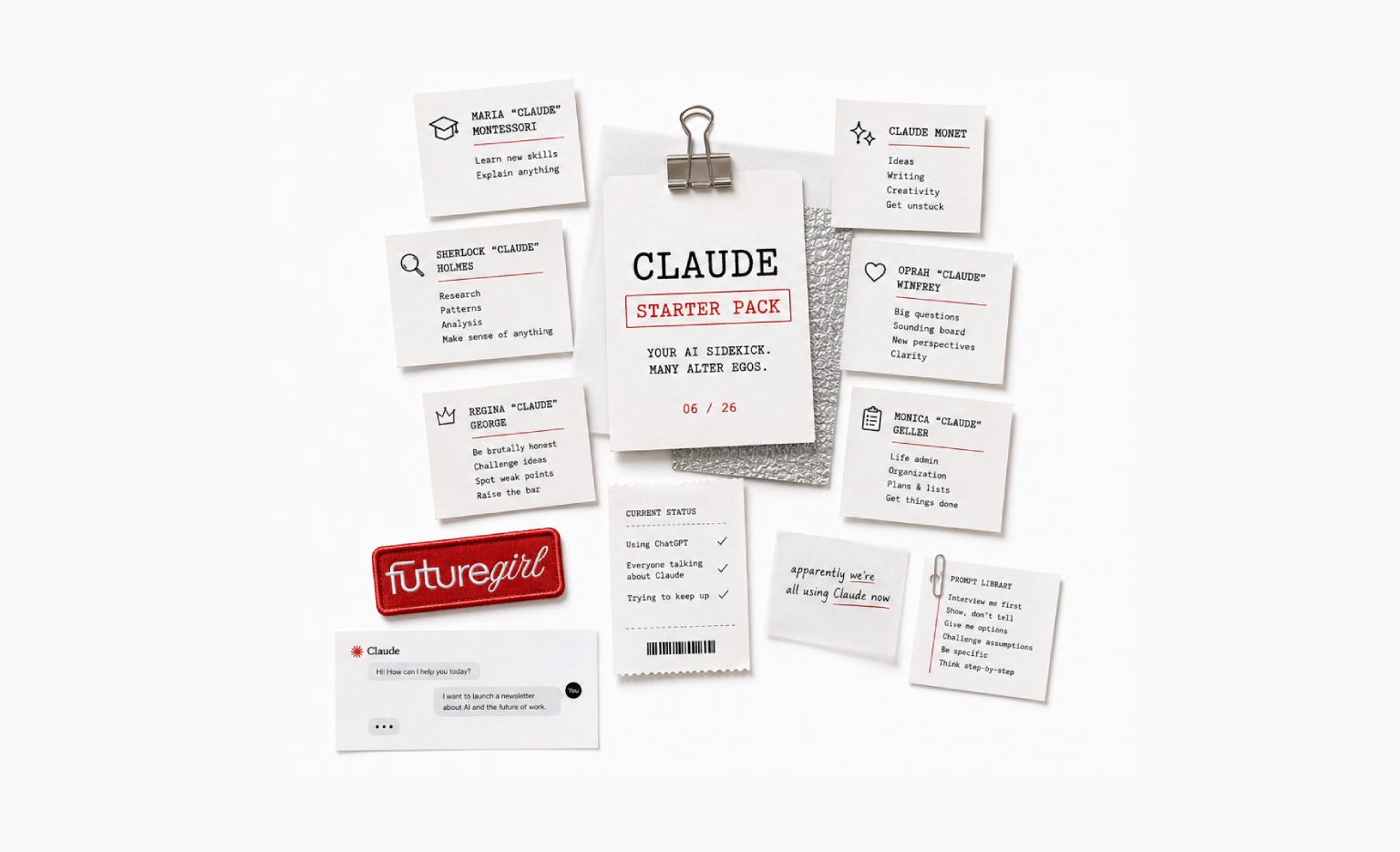
Whenever you think, “There must be an easier way to do this,” try Claude. And its many alter egos. Here’s what people use Claude for daily:
🧑🏫 Maria “Claude” Montessori
For learning topics, especially the ones everyone low-key expects you to understand.
📝 Explain AI agents like I’m a smart friend who missed the last six months of AI news.
📝 Explain investing without assuming I know finance jargon.
📝 Give me a beginner’s guide to SEO. Start with the 20% that creates 80% of the results.
🧹 Marie “Claude” Kondo
For organizing messy notes, giant documents, and random thoughts.
📝 Summarize this report and tell me what actually matters.
📝 Turn these meeting notes into clear action points.
📝 Organize these ideas into categories and identify themes.
📝 What’s important, what’s interesting, and what’s just noise?
🕵️ Sherlock “Claude” Holmes
For research, spotting patterns, connecting dots, and making sense of a mountain of information.
📝 Compare these three tools and explain the pros and cons of each.
📝 What patterns do you notice across these customer reviews?
📝 Read these articles and tell me what experts disagree on.
📝 What’s the strongest argument for and against this idea?
🔮 Oprah “Claude” Winfrey
For big questions and when you need a sounding board (that’s not your judgy friend).
📝 Help me think through this decision.
📝 What am I not considering?
📝 Challenge my assumptions.
📝 Give me three different ways to look at this problem.
🧑🎨 Claude Monet
For creative work and getting unstuck when your brain has decided to go offline.
📝 Give me 20 newsletter ideas about AI and the future of work.
📝 Turn these messy notes into an article outline.
📝 Give me five unexpected angles for this topic.
📝 What would make this idea more interesting?
🙅♀️ Regina “Claude” George
For turning on mean girl modus in Claude.
📝 Review this article like a skeptical editor.
📝 Review this landing page like a first-time visitor.
📝 What objections might customers have?
📝 Where is this argument weak or unclear?
🎯 Monica “Claude” Geller
For life admin. Boringly practical, but oh so helpful.
📝 Create a packing list for a two-week trip to Japan.
📝 Plan a weekly meal plan around these ingredients.
📝 Help me compare these three health insurance options.
Lastly, Claude is also a great career coach. Really. Read why:
Claude, can I pull you for a quick chat?

I hate to admit this, but I am SO locked in on Love Island. Twenty plus hours of my time wasted, and counting. Just me in my room with the illegal stream I found on Reddit.
Before we get you set up, a quick intermission:
🚨 Claude can be delulu
Claude can be convincingly wrong. Use your brain, question things that seem off, double-check facts and don’t use it as a lawyer for like, serious situations.
*Rolls up sleeves* How do I set this all up?
Step 1. Open Claude and create an account
There’s web and mobile app. The web version is for real work. The app is great for quick questions, voice notes, and random shower thoughts.
Start with Claude in browser. Download the desktop app for Mac or Windows to use Claude Cowork and Code (don’t stress, that’s for another post).
You’ll see a lot of buttons. Let’s focus on the 20% that create 80% of the value.
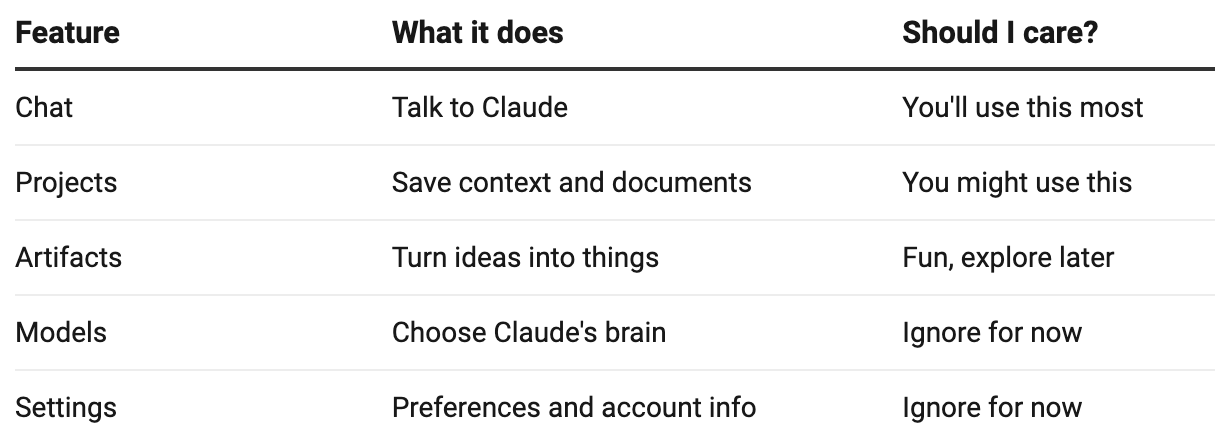
A chat is a conversation. A project we’ll discuss in step 2.
An artifact is the thing that comes out of the conversation. Think articles, tables, checklists, interactive tools, mini websites, calculators, quizzes, and more.
Tell Claude: “Create a travel budget calculator for a two-week trip to Japan” and it generates a working tool instead of just describing one. I love this feature!
Models are the different versions of Claude’s brain. By default, it uses Sonnet.
💡 A note on models
Use Sonnet until you hit a problem it can’t solve. Choose Opus if you’re staring at a complicated problem and wondering how on earth to solve it.
For settings, you can explore them briefly and turn on/off notifications. Otherwise, there's nothing essential to configure before getting started.
Chat. Artifact. Confused by all the AI-terms? I wrote a glossary for ya:

Step 2. Create a project
Most people use Claude like Google: Ask question, get answer, close tab, repeat tomorrow.
Projects are not mandatory, but unlock an entirely different way of working.
It’s a workspace where you add everything that Claude should remember across multiple conversations inside a project.
Think of it as onboarding a new team member. Which files go in their welcome package to succeed and really “get” the brand?
Upload notes, reports, PDFs, presentations, meeting transcripts, etc.
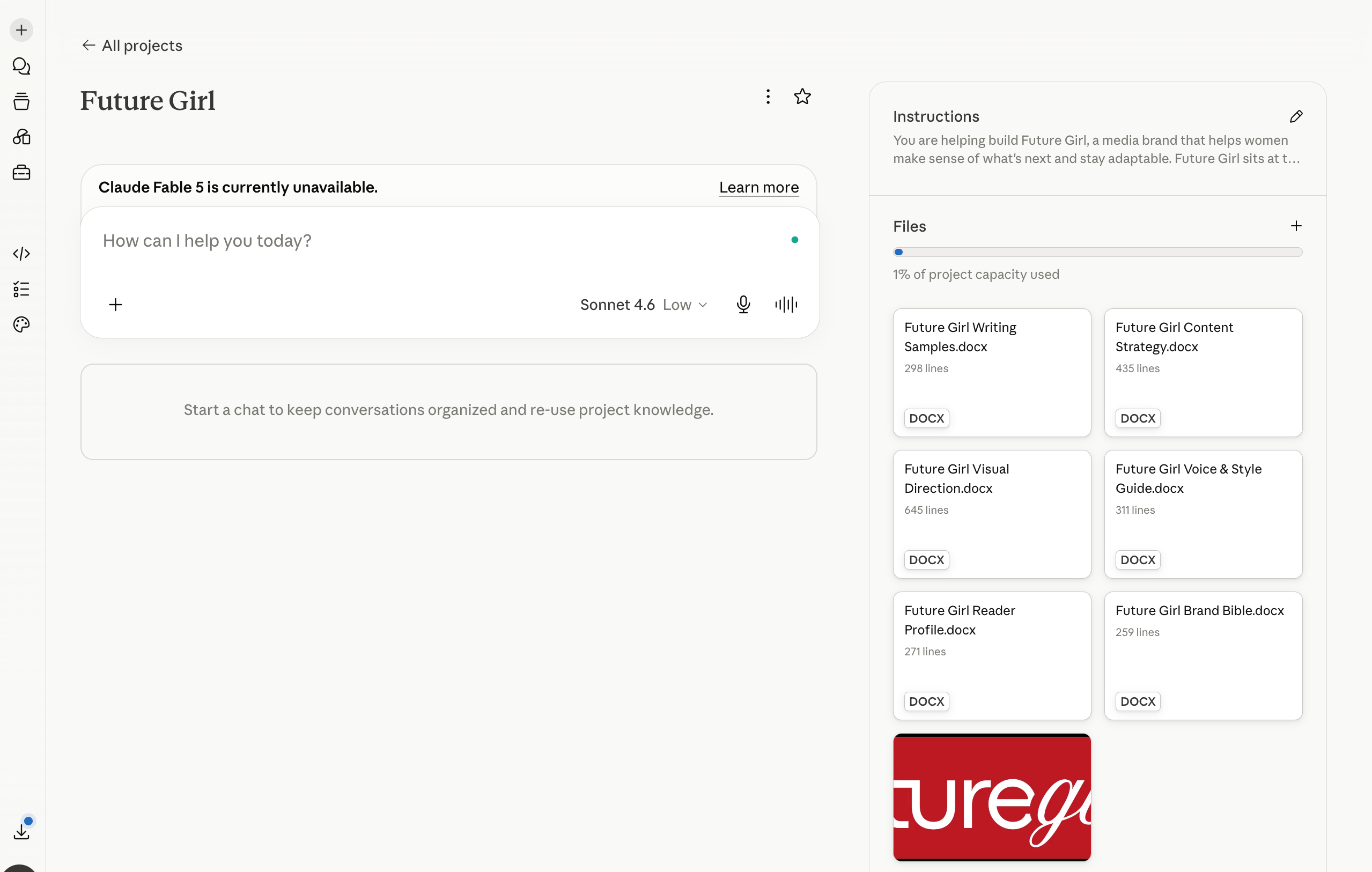
For Future Girl, I added:
Brand bible
Reader profile
Voice and style guide
Visual direction
Content strategy
Writing samples
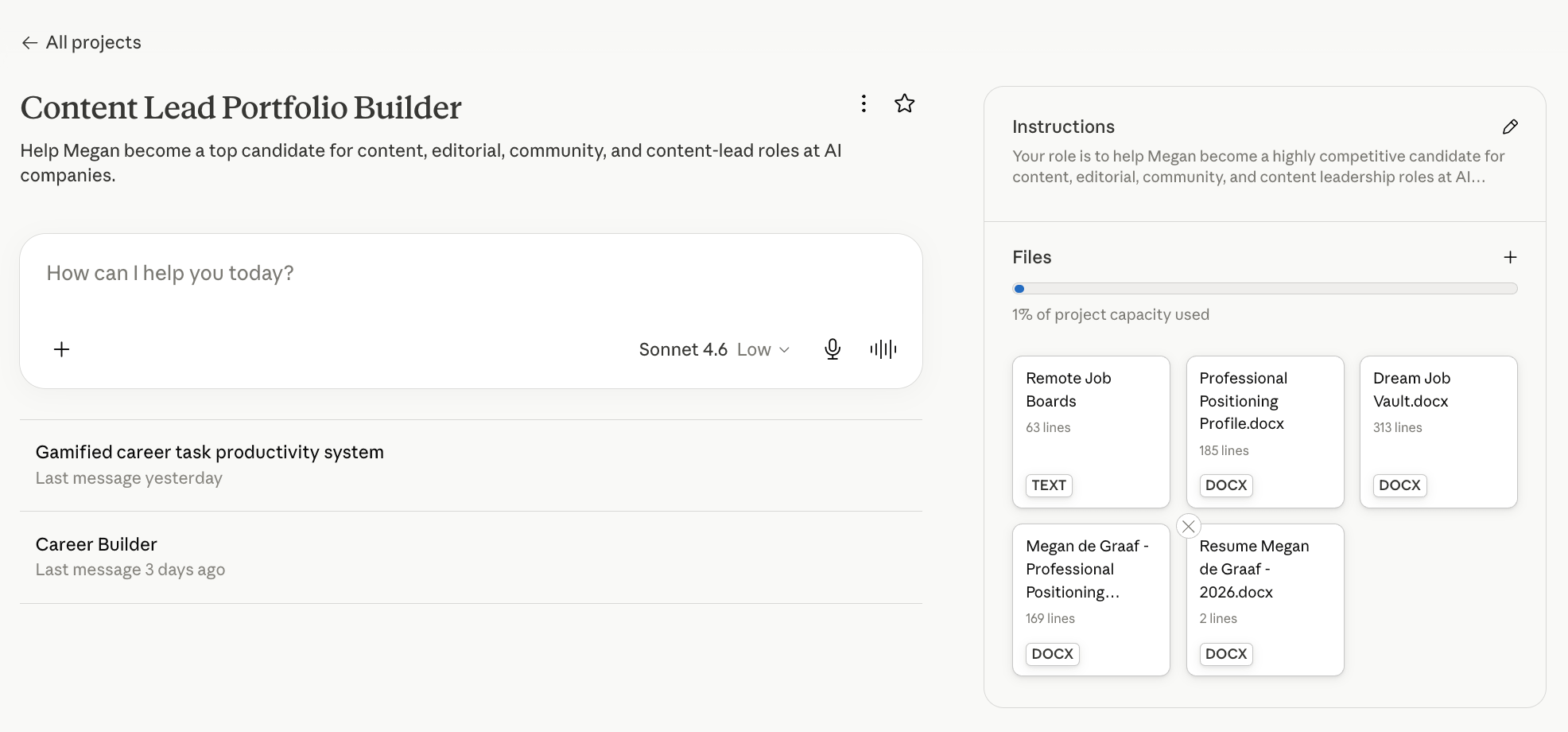
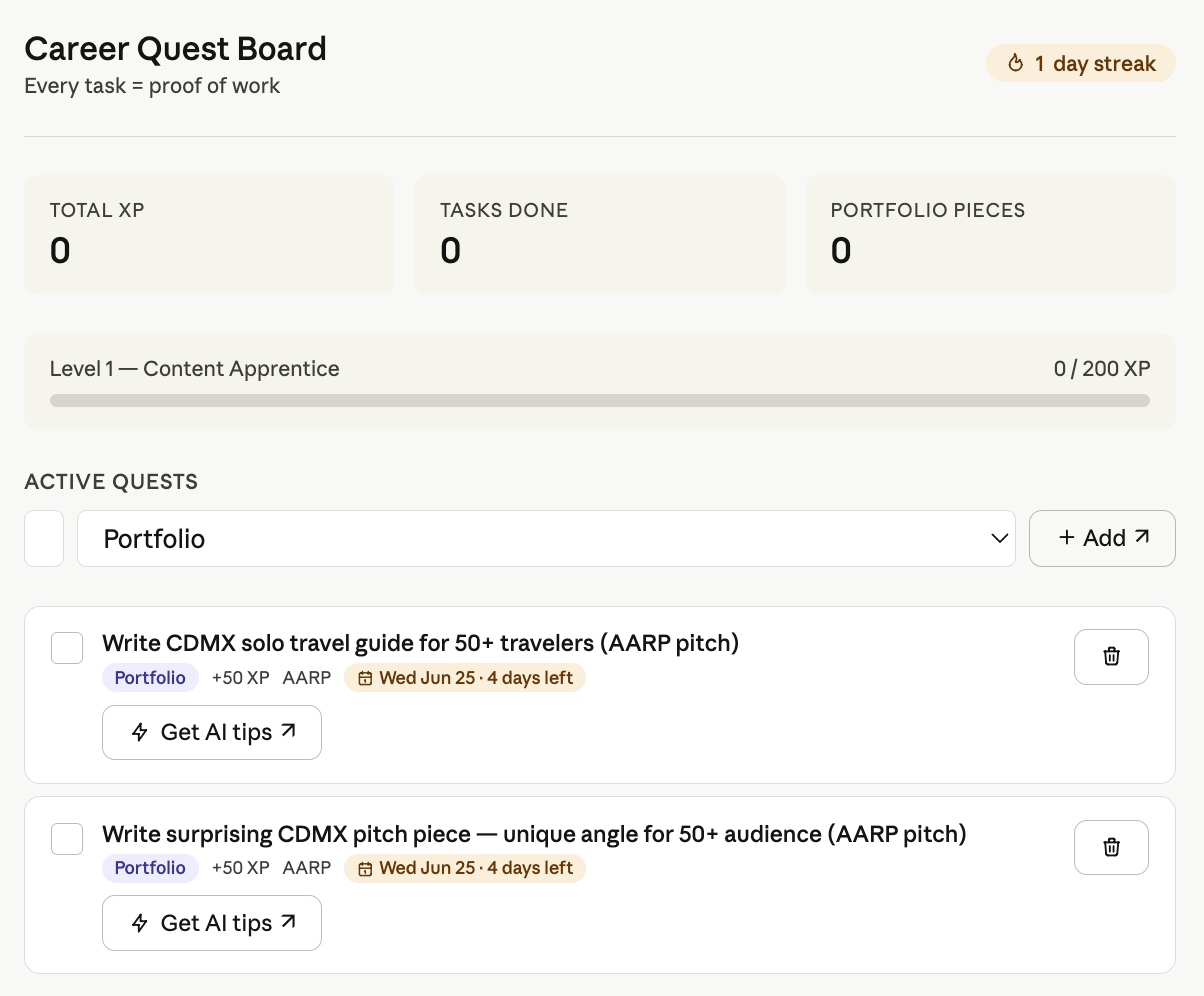
I also built myself a career hub and uploaded my resume, dream jobs, goals and a list of remote job boards. I’ll use this project to start chats around career opportunities.
It also built me a gamified to-do board. Like Notion, but much more fun.
Projects are great when you:
Create content regularly
Run a business
Work with the same clients repeatedly
Research topics over time
Learn a new skill
Want Claude to understand your goals and preferences
How do I talk to my new friend?
Claude is smart, but it doesn’t live inside your brain.
It doesn’t know your audience, goals, brand voice, weird preferences, or that one thing that drives you nuts in AI-content (not this, not that, just X… dude kill meeee).
You gotta be specific. Tell Claude what to do (rather than what not to do). Tell it what you love and hate. The internet calls this prompt engineering. Us regular folks know this as writing a decent brief.
This counts for all AI. I do the same in ChatGPT, and boy does it know 😅


Most prompts become much better when you include:
What’s happening?
What do you want Claude to do?
What should it avoid?
An example
What should the final output look like?
🙅♀️ Write a LinkedIn post.
✅ I run a newsletter about AI and the future of work for women. Write a LinkedIn post about AI agents. Use a conversational tone, avoid jargon, keep it under 200 words, and end with a question.
Show, don’t tell Claude
Claude is a pro at pattern-learning. Using examples often outperforms paragraphs of instructions, because it can reverse-engineer what you like instead of guessing.
📝 I'm applying for a Head of Content role. Here are three cover letters I've written that got interviews. Analyze the patterns, tone, and structure. Then write a new cover letter for the job description below.
Let Claude interview you
Starting projects by asking Claude to interview you first might be the most underrated prompting trick around. It can’t solve a problem if it doesn’t understand the situation.
📝 I want to launch a newsletter about marketing and AI. Before giving advice, ask me up to 15 questions about my expertise, goals, audience, interests, available time, and business model. Once you have enough information, help me create a launch plan.
Make Claude your worst critic
Most use Claude to create, but the smart money move is to let it destroy things.
📝 Review my website homepage like three people: A first-time visitor, a skeptical buyer and a busy founder. Tell me what each person would find confusing, boring, or unconvincing.
Ask for alternate timelines
The first answer is the most predictable one. The memorable, surprising, funny, clever, or strategic ones usually show up a few ideas later. Ask Claude for options.
📝 Create 20 newsletter topic ideas about AI. Split them into:
5 surprising
5 contrarian
5 practical
5 “everyone is talking about this but nobody explains it well”
Then rank them from strongest to weakest and explain your reasoning.
Choose your main character
Claude gives fairly average answers (based on the collective wisdom of the internet). With a lens, it will think in a particular framework, audience, expertise, or style.
📝 Review my LinkedIn profile like a recruiter hiring for a senior marketing role.
📝 Analyze this startup idea like an investor deciding whether to fund it.
📝 Review my newsletter like Ann Handley. Focus on storytelling, clarity, and reader engagement.
📝 How would Justin Welsh build an audience around this topic?
Share all your hopes and dreams
The more real material Claude has, the less guessing it has to do. Anthropic’s own documentation repeatedly emphasizes context as the foundation of good outputs.
📝 Here are my website, last five newsletters, three competitor newsletters and audience description. Analyze all of this and identify the three biggest opportunities I’m missing.
🚀 Powermove: Combine prompts and watch wisdom unfold
📝 I want to reposition my freelance business so that I attract higher-paying clients. First, ask me up to 10 questions. Challenge weak assumptions. Identify gaps in my thinking.
Once you have enough information, act as a strategic advisor and give me:
A positioning recommendation
Three alternative approaches
Risks and blind spots
A 30-day action plan
Be direct and specific.
And lastly, Claude has a memory and is surprisingly like us. The more you chat, the less focused it can get. If responses feel blah, ask Claude for a summary of what y’all discussed. Start a new chat, paste the summary, and continue with renewed energy.
Your first mission with Claude as your sidekick
1. What have you been saying you’ll get around to?
Think about this for a good long minute. It could be:
Organizing notes
Writing a newsletter
Updating your CV
Building a financial tracker or budgeting tool
Learning a new skill
Making a difficult decision
Researching a topic
Creating a content plan
2. How could Claude help with this?
Explain your task or problem clearly. Try one of the prompt frameworks above and see what it replies. Don’t overthink: give feedback, refine, and add details as you go.
3. Share your notes
What did you use Claude for? And did it help? Can’t wait to hear all about it!
Next post, I’ll show you how I’ve been using Claude. I’m genuinely so excited! 🤩